SMS Terms and Conditions
The terms and conditions for AVCleared and LevelRated text alerts: how you opt in, how often we text, costs, and how to stop them with STOP or get help with HELP.
Last updated November 21, 2026.
Effective: November 20, 2026
These are the terms and conditions for our text message (SMS) program.
The program
Program name: AVCleared and LevelRated Account Alerts
Run by: AV Cleared LLC, 6063 Hudson Road, Woodbury, MN 55125
Sent from: (826) 253-2728
Help: reply HELP, or email support@avcleared.com
AV Cleared LLC runs avcleared.com and levelrated.com, a business-to-business platform for verifying AV and low-voltage contractors. Registered users can choose to get text alerts about their own account. We do not send marketing or promotional texts.
What we text you about
Only the events you choose, for example:
- a contractor's insurance certificate or license is about to expire, or has expired
- a new quote request, bid, RFQ question or message
- a change to a project, crew, booking or on-site audit
- account notices, such as a failed payment
Every text starts with the brand name, for example: "AVCleared: Your general liability certificate expires Nov 20. Upload the renewal in AVCleared. Reply STOP to opt out."
How you opt in
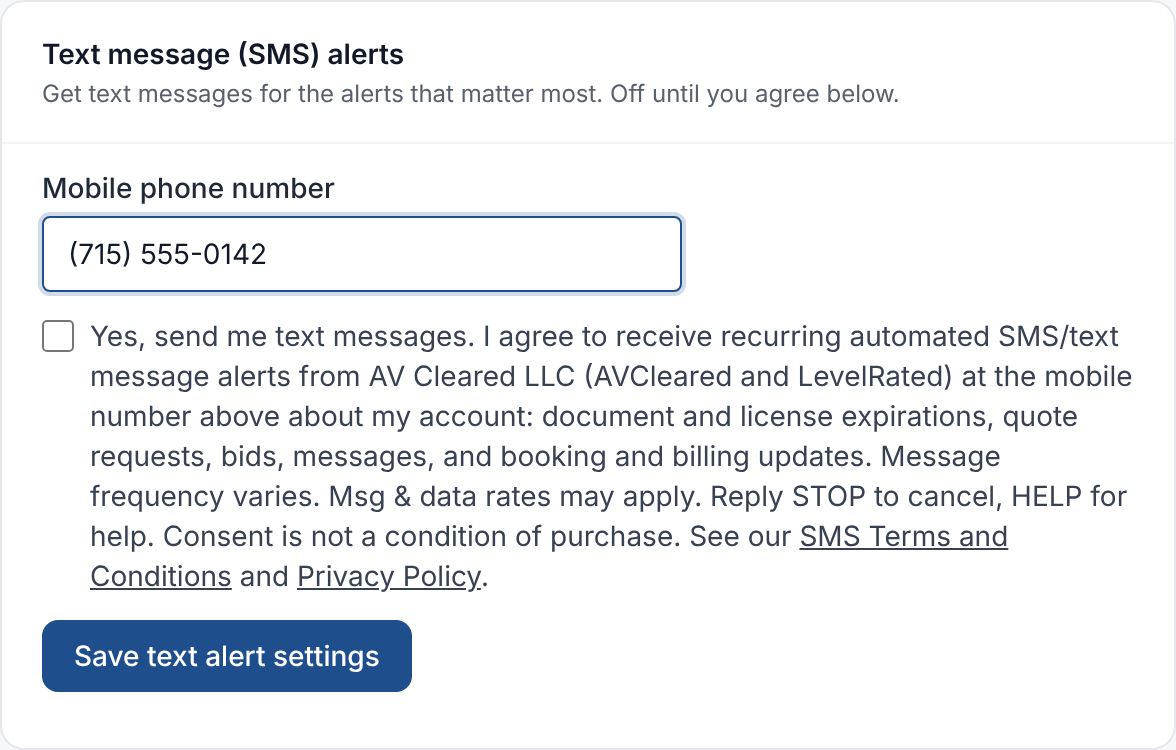
Texts are off until you turn them on. There is one way to opt in: a web form inside your account. A signed-in user goes to Settings > Notifications, and in the Text message (SMS) alerts box:
- enters their mobile phone number,
- ticks the consent checkbox, and
- clicks Save text alert settings.
The checkbox is not ticked in advance. Its wording is: "Yes, send me text messages. I agree to receive recurring automated SMS/text message alerts from AV Cleared LLC (AVCleared and LevelRated) at the mobile number above about my account: document and license expirations, quote requests, bids, messages, and booking and billing updates. Message frequency varies. Msg & data rates may apply. Reply STOP to cancel, HELP for help. Consent is not a condition of purchase. See our SMS Terms and Conditions and Privacy Policy."
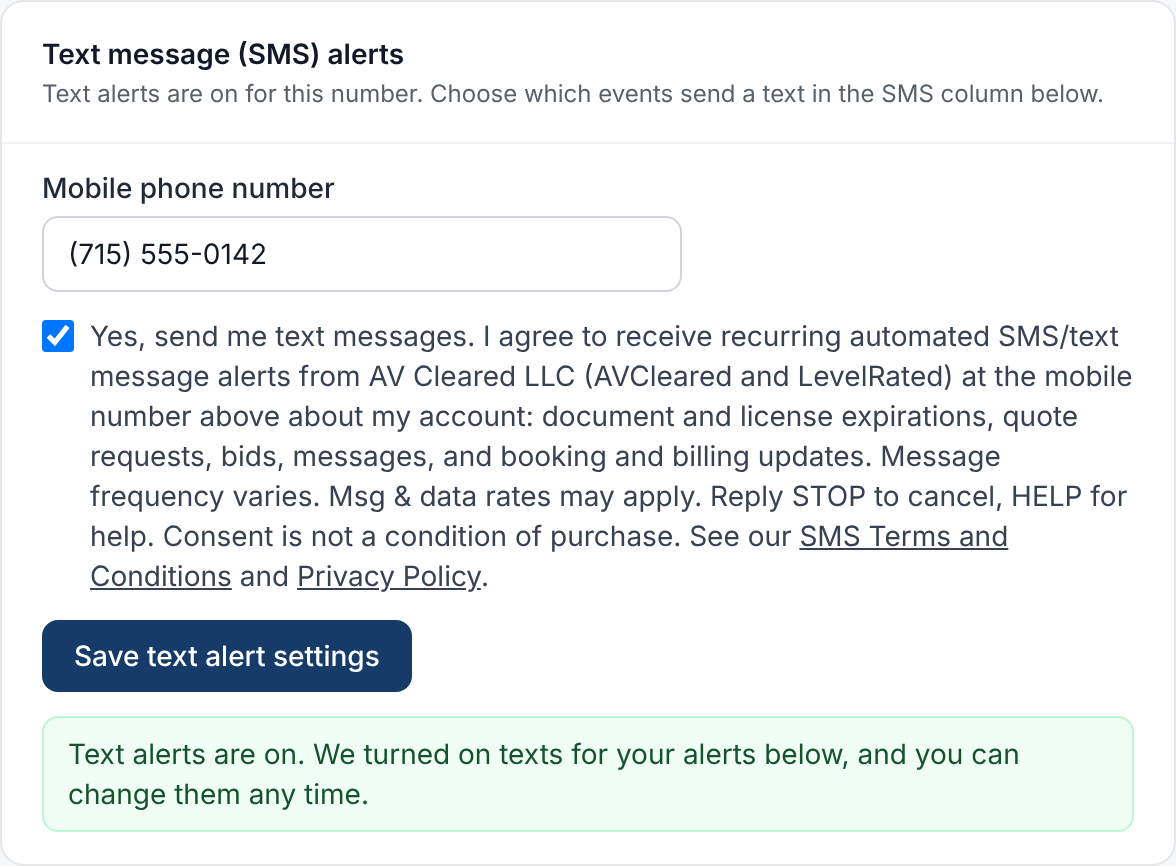
After saving, the page confirms "Text alerts are on." The user can then choose which events send a text in the SMS column below the box. Unticking the consent box and saving turns all texts off.
This is the opt-in form, before and after it is submitted:
We never text a number that has not been opted in this way, we never text a number other than the one the user agreed for, and we never buy or rent phone numbers. Consent to texts is not a condition of any purchase.
Message frequency
Message frequency varies. It depends on the alerts you turn on and how much activity your account has.
Cost
Message and data rates may apply. AV Cleared LLC does not charge for text alerts. Ask your mobile carrier about your plan.
How to stop texts (STOP)
Reply STOP to any text to stop all texts from us. You will get one confirmation text and no more after that. You can also untick the SMS boxes in Settings > Notifications at any time. To start again, reply START.
How to get help (HELP)
Reply HELP to any text, or email support@avcleared.com.
Carriers
Carriers are not liable for delayed or undelivered messages. Supported carriers include major US carriers; availability may vary.
Privacy
We do not sell or share your SMS opt-in data or personal information with third parties for marketing purposes. Our Privacy Policy explains what we collect and how we use it, including the text message section.
Changes and contact
These terms are part of our Terms of Use. We will post any change here and update the date above.
AV Cleared LLC
6063 Hudson Road, Woodbury, MN 55125
support@avcleared.com