HubSpot integration
Keep HubSpot up to date with your pipeline, tracked companies, contractor network and quote requests, without copying anything by hand.
What the app does
The LevelRated app for HubSpot sends your AVCleared records to HubSpot as deals, companies, contacts and notes. New and changed records arrive within a minute, and a full sync runs when you connect, when you press Sync now, and every night. Records we sent before are updated in place, companies and contacts you already have in HubSpot are matched instead of duplicated, and a deal you mark won or lost in HubSpot keeps the stage you chose.
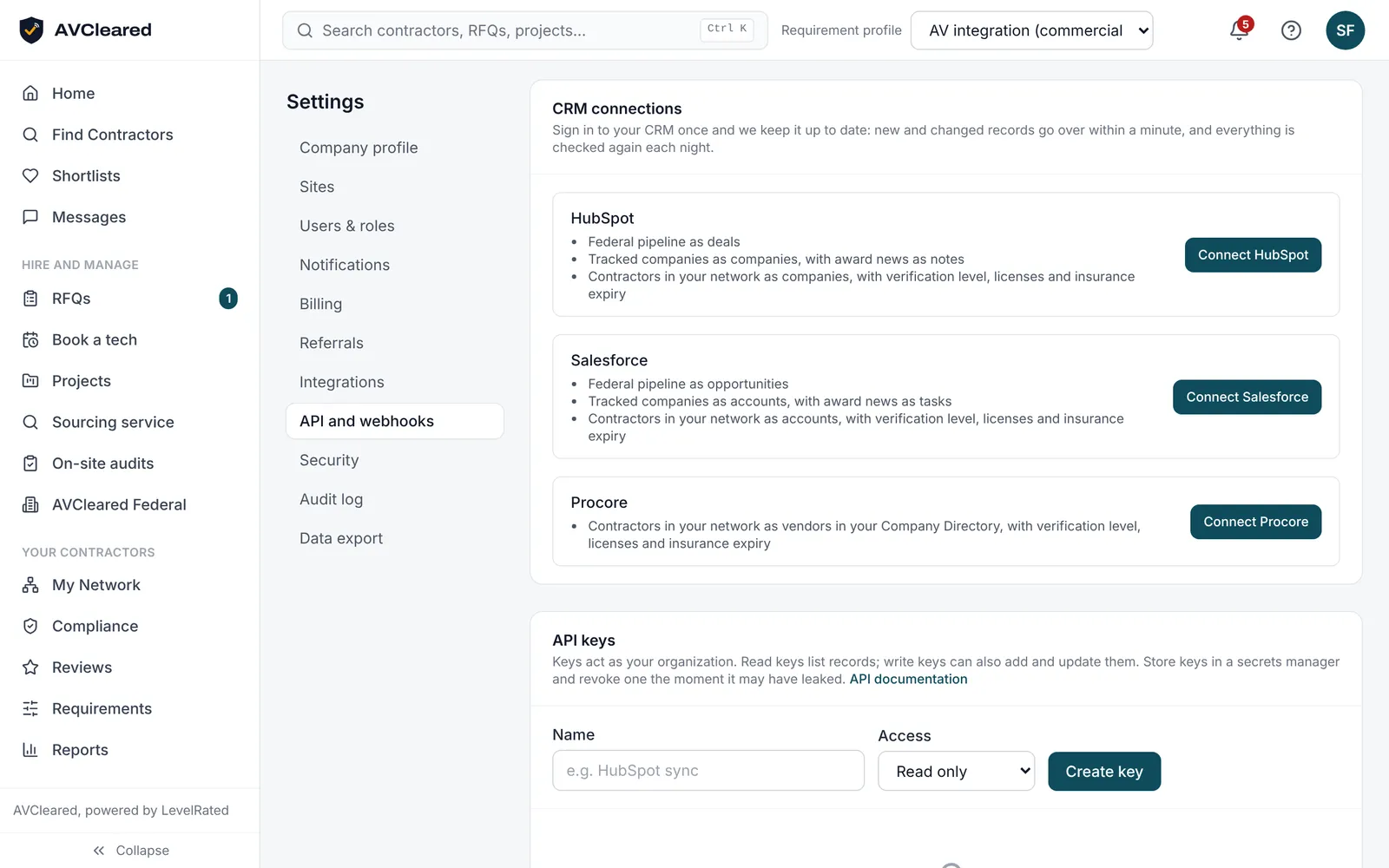
CRM connections in Settings
Screenshots use invented sample companies. Trust grades, star ratings, review counts and contact details are blurred here; they show in full on paid plans.
Before you start
- A LevelRated or AVCleared organization on an Enterprise plan or with AVCleared Federal. See plans.
- You are an owner or admin of that organization.
- In HubSpot, you are a Super Admin or have App Marketplace Access permission. Any HubSpot edition works, including free CRM.
Install and connect
You can start from either side. Both end with the same connection.
From the HubSpot App Marketplace
Find the app
In HubSpot, open the Marketplace icon, search for LevelRated, and click Install.Sign in to LevelRated
HubSpot asks you to sign in to LevelRated. Sign in (or create an account) with the organization you want to connect. If you belong to several, switch to the right one first; the app connects the organization you are working in.Approve access
HubSpot shows the data the app can use (deals, companies and contacts). Choose the HubSpot account and click Connect app.Done
You return to HubSpot. The first full sync starts right away; most accounts finish within a few minutes.
From LevelRated or AVCleared
Open CRM connections
Go to Settings > API and webhooks (federal users: Federal > Integrations).Click Connect HubSpot
Sign in to HubSpot if asked, choose the HubSpot account, review the access, and click Connect app.Back in LevelRated
The card shows HubSpot as connected, with the account name, and the first sync starts.
Choose what syncs
On the HubSpot card, tick the kinds you want and click Save. Everything your plan includes is on at first. Turning a kind off stops new updates for it; records already in HubSpot stay. Deals go into your default Sales Pipeline: Found → Appointment scheduled, Qualify → Qualified to buy, Capture → Presentation scheduled, Proposal → Decision maker bought-in, Submitted → Contract sent, and Won or Lost → Closed won or Closed lost.
Use it
- Automatic: add or change a pipeline record, track a company, add a contractor to your network, or confirm a quote request, and HubSpot updates within a minute.
- Sync now: sends the newest 2,000 records of each kind again, for example after you turned a kind back on.
- Open in HubSpot: linked records show a link straight to the HubSpot record.
- Problems: the card shows the last error. If HubSpot stops accepting our access (for example, the app was uninstalled in HubSpot), the card says Needs reconnecting and nothing more is sent until you connect again.
Shared data
| LevelRated record | HubSpot object | Direction | Who gets it |
|---|---|---|---|
| Federal pipeline records | Deals (default Sales Pipeline) | LevelRated to HubSpot. Reads a deal's stage so a deal you closed in HubSpot keeps your stage. | AVCleared Federal |
| Tracked federal companies | Companies, with award news, contract endings and wins as notes | LevelRated to HubSpot. Reads companies by website domain to update the one you have instead of adding a duplicate. | AVCleared Federal |
| Contractors in your network | Companies (address, phone, website, verification level, licenses, insurance expiry) | LevelRated to HubSpot. Reads companies by website domain to avoid duplicates. | Hiring companies on Enterprise |
| Confirmed quote requests | Contacts, with the request as a note | LevelRated to HubSpot. Reads contacts by email so a person is never added twice. | Contractors with AVCleared Federal |
Why the app asks for each permission
- crm.objects.deals.read / write
- Create and update deals for your federal pipeline; read a deal's current stage before updating it.
- crm.objects.companies.read / write
- Create and update companies; look up an existing company by website domain.
- crm.objects.contacts.read / write
- Create and update contacts for quote requests; look up an existing contact by email.
- oauth
- Added to every HubSpot app: lets us confirm which HubSpot account you connected.
We never delete anything in HubSpot, and we don't read HubSpot records other than to find the match described above.
Disconnect
In LevelRated, open the HubSpot card and click Disconnect. We revoke our access at HubSpot and delete our stored access tokens. Syncing stops at once. Your HubSpot records stay as they are, and we keep only the list of which HubSpot record matches which of ours, so a later reconnect to the same HubSpot account updates them instead of adding copies.
Uninstall
In HubSpot, click the Marketplace icon, choose Connected apps, find LevelRated, then Actions > Uninstall (HubSpot's steps: uninstall an app). Our access ends immediately; the next time we try to sync, the card in LevelRated shows Needs reconnecting and sending stops. Disconnect there as well to remove the card.
What happens to your data
- Records already sent to HubSpot stay in HubSpot after you disconnect or uninstall; delete them there if you want them gone.
- We store your HubSpot access tokens encrypted, and delete them when you disconnect. We store your HubSpot account id and name to show on the card.
- Nothing from HubSpot is copied into LevelRated except record ids (to keep updates in place) and deal stages (read, not stored).
- How we handle data generally: Privacy Policy and Terms of Service.
Help
Email support@avcleared.com or use our contact page. Include your HubSpot account name and what the card says. Developers can also use the API and webhooks.